


Provide CompTIA 220-1101 Practice Test Engine for Preparation
Detailed New 220-1101 Exam Questions for Concept Clearance
CompTIA A+ Certification Exam: Core 1 (220-1101) is ideal for individuals who are looking to start a career in the IT industry or for those who are looking to enhance their existing IT skills. CompTIA A+ Certification Exam: Core 1 certification exam is recognized by employers worldwide, and it is a great way to demonstrate your knowledge and expertise in the field. The CompTIA A+ certification is also a prerequisite for many other advanced certifications in the IT industry.
CompTIA 220-1101, also known as the CompTIA A+ Certification Exam: Core 1, is a certification exam that focuses on foundational knowledge of computer hardware, software, and networking. It is designed to validate the skills and knowledge of entry-level IT professionals and provide them with a solid foundation for a career in the IT industry.
NEW QUESTION # 443
A user is unable to access the internet on a PC. A technician examines the PC and runs the following commands:
Which of the following steps in the troubleshooting process does this series of commands represent?
- A. Identify the problem.
- B. Establish a theory.
- C. Establish a plan of action.
- D. Verify full system functionality.
Answer: D
NEW QUESTION # 444
An IT manager discovered that hundreds of pages of printed materials are being recycled each day because the materials are left on the printer tray instead of being picked up by users.
Which of the following would BEST prevent this waste?
- A. Enable duplex printing to reduce paper utilization.
- B. Require a code or badge before releasing a print job.
- C. Send friendly reminders to not print unnecessarily.
- D. Bill each department for the excess material cost.
Answer: B
Explanation:
If the user stands in front of the printer, he has to authentify himself by a card or PIN, klick on the print job and only after that the printer prints his documents. That would avoid the printing of not necessary documents.
NEW QUESTION # 445
A user reports a workstation is having the following issues:
* OS performance is slow
. The workstation turns off randomly from time to time
. The fans are running loudly
Which of the following is most likely the cause?
- A. The CPU is overheating.
- B. The system is infected with malware.
- C. The hard drive is failing.
- D. The power supply is insufficient.
Answer: A
Explanation:
One of the possible causes of slow OS performance, random shutdowns, and loud fan noise is the CPU overheating. This can happen due to dust accumulation, faulty cooling system, or high CPU usage. Overheating can damage the CPU and other components, so it is important to monitor the CPU temperature and take preventive measures.
Reference:
The Official CompTIA A+ Core 1 Student Guide (Exam 220-1101) eBook1, page 2-9, section "CPU Cooling Methods".
The Official CompTIA A+ Core 1 (220-1101) Certification Study Guide2, page 2-11, section "Troubleshooting CPUs".
NEW QUESTION # 446
A technician needs to adjust the VLAN to allow users in the sales department to access the marketing department's network resources. Which of the following should the technician configure?
- A. Switch
- B. Network card
- C. Server
- D. Hub
- E. Patch panel
Answer: A
Explanation:
To adjust the VLAN configuration, the technician needs to configure the switch. VLANs are configured on switches to segment network traffic logically, even if the devices are connected to the same physical network.
By adjusting the VLAN settings on the switch, the technician can ensure that the sales department has access to the marketing department's network resources.
* C. Switch: VLANs are configured on switches to logically separate or combine network segments.
Why the other options are incorrect:
* A. Network card: A network card is a hardware component that connects a device to a network, but it does not configure VLANs.
* B. Patch panel: A patch panel is used to organize and manage network cables but does not play a role in VLAN configuration.
* D. Server: A server may host resources, but VLANs are managed at the switch level.
* E. Hub: A hub is a basic networking device that simply forwards traffic; it cannot be used to configure VLANs.
This falls under the Networking domain in the CompTIA A+ Core 1 exam.
NEW QUESTION # 447
A user's computer is experiencing poor performance. A technician runs a diagnostic tool on the hard drive, and the results show a significant increase in the number of reallocated sectors. Which of the following steps should the technician take next?
- A. Reformat the hard drive.
- B. Runchkdsk /f on the hard drive.
- C. Run sfc /scannow on the hard drive.
- D. Replace the hard drive.
Answer: D
Explanation:
A significant increase in the number of reallocated sectors on a hard drive is a clear indication that the drive is experiencing physical damage or wear and tear that cannot be repaired through software means. Reallocated sectors are bad sectors that the drive's firmware has marked as unusable and moved data to spare sectors. This is often a precursor to drive failure. Therefore, the most prudent next step is to replace the hard drive to ensure data integrity and system reliability.
References:
* CompTIA A+ Core 1 Exam Objectives Section 5.3: Given a scenario, troubleshoot and diagnose problems with storage drives and RAID arrays.
NEW QUESTION # 448
A technician is diagnosing several device issues reported by employees.
INSTRUCTIONS
Click on each device to review the issue. Then select the appropriate issue and solution from the drop-down menu. Each option may be used more than once.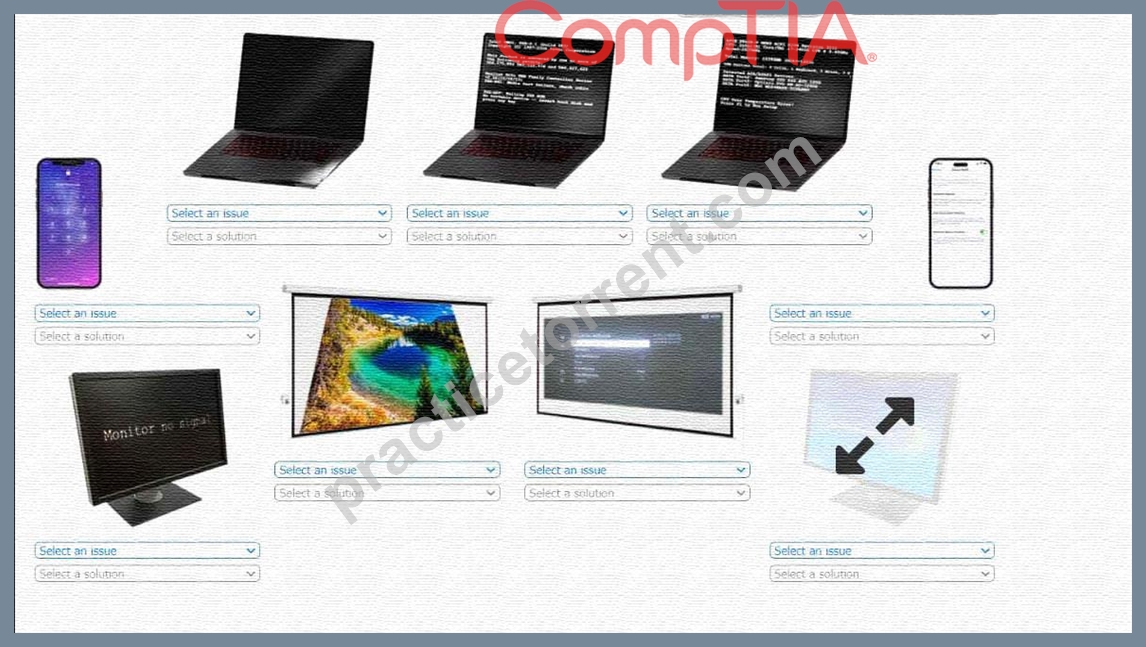
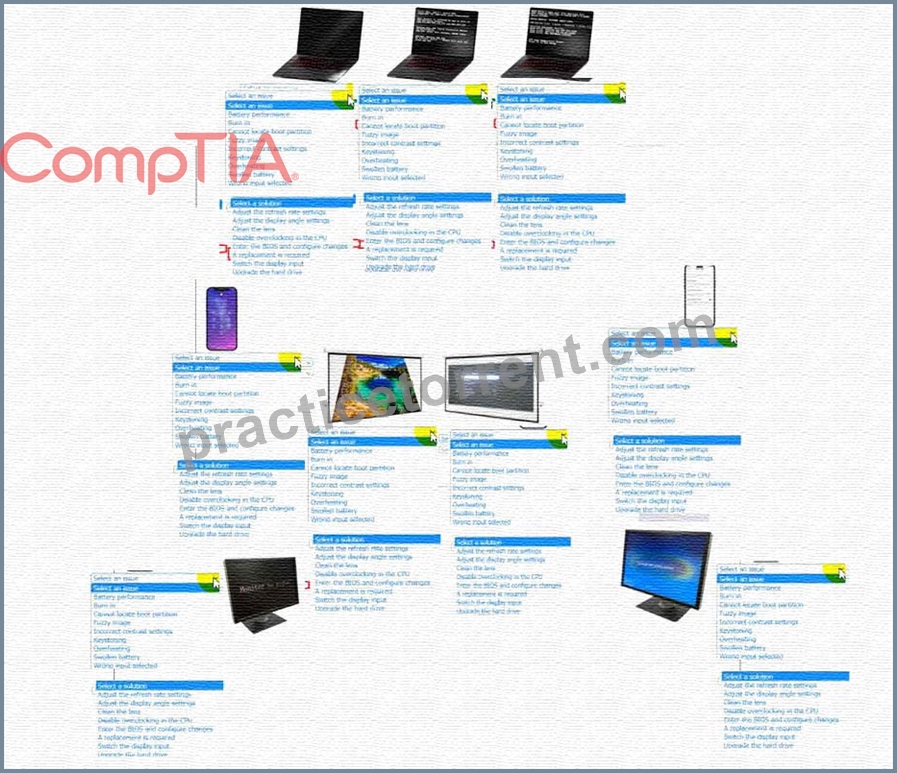
Answer:
Explanation: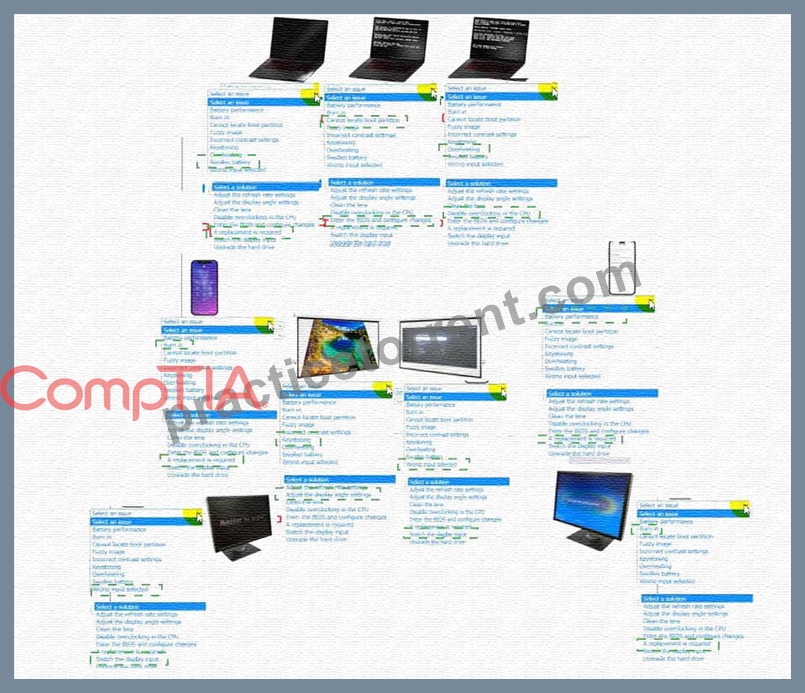
Explanation: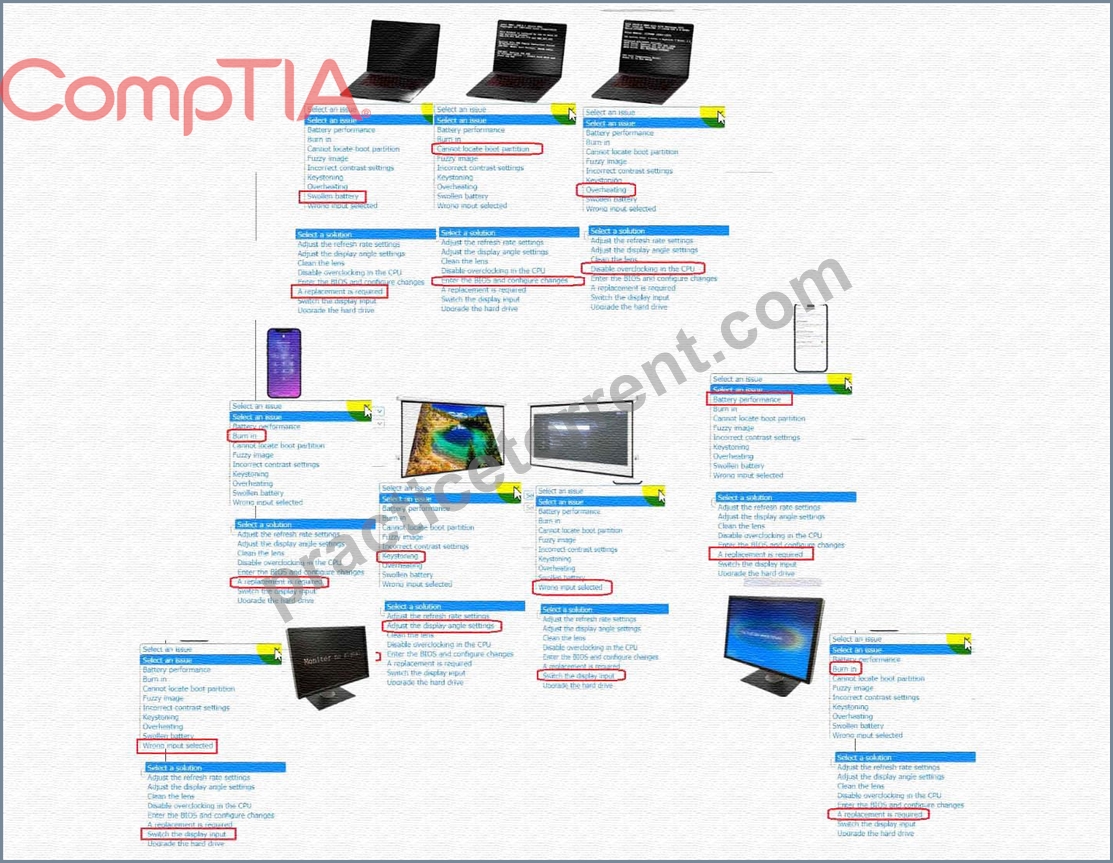
NEW QUESTION # 449
A technician recently discovered me root cause of an application error that several users have been experiencing. The technician updated the configurations on the affected machines and verified full functionality was restored for all users, which of the following actions should the technician perform NEXT?
- A. Work with the developer to proactively collect the application logs to identify future errors of this type.
- B. Write a knowledge base article in the ticketing software to expedite future Incidents.
- C. Submit a bug report to the developer of the application, along with the steps taken to resolve the Issue.
- D. Send an email communication to the company about the issue and the steps taken to resolve it.
Answer: B
Explanation:
Explanation
CompTIA 6-Step Troubleshooting Process:
1. Identify the problem.
2. Establish a theory of probably cause. (Question the obvious)
3. Test the theory to determine cause.
4. Establish a plan of action to resolve the problem and implement the solution.
5. Verify full system functionality and if applicable implement preventative measures.
6. Document findings, actions, and outcomes.
NEW QUESTION # 450
A user sends a print job lo a network printer, and the print job uses double the amount of paper as expected.
Which of the following should the user configure to get the expected result?
- A. Duplex
- B. Collate
- C. Transparency
- D. Landscape
Answer: A
NEW QUESTION # 451
A user reports that printed receipts have black smudges over the entire image. The text is still present but is very dark and sometimes illegible. Which of the following are the MOST likely cause and solution for the printer issue?
- A. The printer is loaded with the wrong type of paper. Replace the receipt paper with carbon paper.
- B. The printhead is too hot. Adjust the temperature down and retry printing.
- C. The blue ink cartridge was loaded with black ink. Put in the correct ink and clean the printhead.
- D. The ribbon is jammed and is rubbing on the paper. Clear the bad ribbon and feed it through properly.
Answer: D
Explanation:
The black smudges over the entire image on a printed receipt are most likely caused by a jammed ribbon that is rubbing on the paper. The solution is to clear the bad ribbon and feed it through the printer properly. Ribbon jams can be caused by various issues, such as incorrect installation or a damaged ribbon. References:
CompTIA A+ Certification Exam Objectives - 220-1001: 4.5 Given a scenario, troubleshoot common printer problems.
NEW QUESTION # 452
When a user tries to print a document on a laser printer, vertical lines appear on the printout. Which of the following should the technician replace?
- A. Fuser
- B. Toner
- C. Drum
- D. Mirror
Answer: C
Explanation:
Vertical lines on a laser printer printout are most commonly associated with issues in the drum unit. The drum is a crucial component in the laser printing process, where it receives an electrostatic image of the document to be printed and transfers toner to the paper. If there are defects or damage to the drum's surface, it can result in vertical lines appearing on the printed output as the drum fails to evenly distribute toner across the page.
Reference:
CompTIA A+ Core 1 (220-1101) Exam Objectives, Section 3.6 Hardware, particularly the part about laser printers and the significance of each component in the printing process, emphasizing the drum's role in image transfer.
Understanding of laser printer operation, specifically the function of the drum unit and common issues that can affect print quality.
NEW QUESTION # 453
A user is installing a new display on a desktop computer that only has a single DVI port for video input and a single HDMI port tot video output.
Which of me following does the technician need to complete the setup?
- A. DisplayPort to HDMI adapter
- B. DVI to HDMI cable
- C. DigitaMo-analog converter
- D. A/v switcher
Answer: B
Explanation:
The technician will need to connect the DVI port on the computer to the new display's HDMI port.
To do this, a DVI to HDMI cable will be needed. This type of cable will allow the computer's DVI video signal to be transmitted to the new display's HDMI port. A digital-to-analog converter (DAC) is used to convert a digital signal to an analog signal. An A/V switcher is used to switch between multiple audio and video sources and display them on a single monitor or display. A DisplayPort to HDMI adapter is used to convert a DisplayPort signal to an HDMI signal, but it is not necessary in this scenario as the computer has a DVI port and not a DisplayPort.
NEW QUESTION # 454
Which of the following is the best example of when to use virtualization?
- A. To prevent users from circumventing password policies
- B. To deploy software updates to user machines
- C. To enhance security by centralizing all user desktops
- D. To manage shared folders by user accounts
Answer: C
Explanation:
One of the benefits of virtualization is that it allows you to create and manage multiple virtual machines (VMs) on a single physical computer. This can be used to enhance security by centralizing all user desktops on a server, rather than storing them on individual user machines. This way, the user desktops can be isolated from each other and from the host machine, preventing malware infections, data breaches, and unauthorized access. Additionally, the user desktops can be easily backed up, restored, updated, and monitored by the administrator, reducing the risk of data loss and downtime.
This type of virtualization is called desktop virtualization, and it separates the desktop environment from the physical hardware the user interacts with1. The user can access their virtual desktop from any device, such as a laptop, tablet, or smartphone, using a remote display protocol. The user experience is similar to using a local desktop, but with improved security and manageability.
Reference:
* What Is Virtualization, and Why Should You Use it?, section "Desktop Virtualization".
NEW QUESTION # 455
A technician is attempting to connect the wired LANs at two nearby buildings by installing a wireless point-to-point connection. Which of the following should the technician consider?
- A. RFID frequency range
- B. Allowable limits for transmit power
- C. Bluetooth version compatibility
- D. NFC protocol data rate
Answer: B
Explanation:
When installing a wireless point-to-point connection between two buildings, the technician should consider the allowable limits for transmit power, which vary depending on the country or region. Exceeding these limits could interfere with other wireless devices or violate regulations. NFC protocol data rate, RFID frequency range, and Bluetooth version compatibility are not relevant for a wireless point-to-point connection.
NEW QUESTION # 456
A technician is working to replace a single DDR3 RAM module on a laptop that has two occupied slots_ When the technician tries to tum on the laptop, the computer starts beeping and does not pass POST The technician double-checks the newly installed RAM and notices a motherboard message indicating low voltage.
Which of the following is the most likely cause of this Issue?
- A. Unsupported memory
- B. Faulty power adapter
- C. Incorrect BIOS settings
- D. Failing CMOS battery'
Answer: A
Explanation:
Explanation
Memory modules are physical components that store data and instructions for the computer to access and process. Memory modules have different specifications and features, such as type, speed, capacity, voltage, and form factor. These specifications and features must be compatible with the motherboard and the processor of the computer, otherwise the memory modules may not work properly or cause errors.
In this scenario, the technician is working to replace a single DDR3 RAM module on a laptop that has two occupied slots. DDR3 stands for Double Data Rate 3, and it is a type of memory technology that offers faster performance and lower power consumption than its predecessors. DDR3 RAM modules have different variants, such as DDR3L, DDR3U, or DDR3R, which have different voltage requirements. For example, DDR3L operates at 1.35V, DDR3U operates at 1.25V, and DDR3R operates at 1.5V.
When the technician tries to turn on the laptop, the computer starts beeping and does not pass POST. POST stands for Power-On Self-Test, and it is a process that checks the hardware components and functionality of the computer before loading the operating system. If POST detects an error or a failure, it may produce a series of beeps or codes to indicate the problem. The number and pattern of beeps or codes may vary depending on the manufacturer or model of the computer.
The technician double-checks the newly installed RAM and notices a motherboard message indicating low voltage. This means that the motherboard is not receiving enough power from the memory module to operate normally. This could indicate that the memory module is not compatible with the motherboard or the processor, or that it is defective or damaged. The most likely cause of this issue is that the technician installed an unsupported memory module that has a lower voltage than what the motherboard or the processor requires.
To resolve this issue, the technician should remove the newly installed RAM module and replace it with a compatible one that has the same voltage as the existing ones. The technician should also check the specifications and features of the motherboard and the processor to ensure that they support the type, speed, capacity, and form factor of the memory modules. The technician should also follow proper safety precautions when handling memory modules, such as wearing an anti-static wrist strap, avoiding physical damage or static discharge, and aligning the notches correctly.
NEW QUESTION # 457
Atechnician is replacing all RJ45 cables in a customer environment. Which of the following are the BEST tools to execute the task? (Select TWO).
- A. Crimper
- B. Optical fiber tester
- C. Cable tester
- D. Screwdriver
- E. Coaxial cable
- F. Scissors
Answer: A,C
Explanation:
A cable tester and a crimper are the best tools to execute the task of replacing all RJ45 cables in a customer environment. A cable tester can be used to check the continuity and quality of a cable, and a crimper can be used to attach RJ45 connectors to the ends of a cable. An optical fiber tester is a tool that can be used to test fiber optic cables, which are not RJ45 cables. Scissors are not a tool for replacing cables, but for cutting them.
A coaxial cable is a type of cable that has a single copper conductor at its center, which is not an RJ45 cable either. A screwdriver is not a tool for replacing cables, but for fastening or loosening screws.
NEW QUESTION # 458
A user reports a repetitive clicking noise is coming from a personal laptop. A technician notes the laptop's inputs are severely delayed. Which of the following should the technician replace to resolve the issue?
- A. The battery
- B. The integrated keyboard
- C. The memory
- D. The storage device
Answer: D
Explanation:
A repetitive clicking noise coming from a laptop is usually a sign of a failing hard disk drive (HDD), which is a type of storage device that uses spinning platters and moving heads to read and write data. A failing HDD can also cause severe delays in input and output operations, as well as data loss or corruption. The technician should replace the HDD with a new one or upgrade it to a solid state drive (SSD), which is another type of storage device that uses flash memory and has no moving parts. Reference: https://partners.comptia.org/docs
/default-source/resources/a-core-series-combined-content-guide (page 24)
NEW QUESTION # 459
Which of the following should a technician use in DNS to map a device to an IPv6 address?
- A. AAAA
- B. A
- C. MX
- D. CNAME
Answer: A
Explanation:
In DNS (Domain Name System), the AAAA record is used to map a domain or device to an IPv6 address. IPv6 addresses are 128-bit addresses, and the AAAA record is specifically designed for handling these larger addresses.
NEW QUESTION # 460
A technician is upgrading a faulty motherboard that was ordered by an end user for an old, high-end desktop computer. However, the technician is unable to install the CPU into the socket. Upon closer inspection, the technician notices the pins on the CPU do not line up with the socket. Which of the following would be the best course of action for the technician to take NEXT?
- A. Try to set as many pins as possible.
- B. Install an adaptor to create a universal socket.
- C. Verify the socket type and manufacturer.
- D. Find a compatible motherboard for the CPU.
Answer: C
Explanation:
you need to know the socket type before you can go and find the replacement motherboard
NEW QUESTION # 461
Which of the following devices is capable of dynamically distributing an IP address?
- A. Injector
- B. Router
- C. Switch
- D. Hub
Answer: B
Explanation:
A router is a device that can dynamically distribute an IP address to the devices connected to its network using a protocol called DHCP (Dynamic Host Configuration Protocol). DHCP allows a router to automatically assign an IP address and other network configuration information to a device when it joins the network, without requiring manual intervention from the administrator. A router can also act as a gateway between different networks, such as a local area network (LAN) and the internet1.
A hub is a device that connects multiple devices on a network and forwards data packets between them.
However, a hub does not assign IP addresses or perform any routing functions. A hub operates at the physical layer of the OSI model and does not understand IP addresses or other network protocols.
A switch is a device that connects multiple devices on a network and forwards data packets between them based on their MAC addresses. A switch can improve the performance and security of a network by reducing collisions and isolating traffic. However, a switch does not assign IP addresses or perform any routing functions. A switch operates at the data link layer of the OSI model and does not understand IP addresses or other network protocols.
An injector is a device that provides power to another device over an Ethernet cable, such as a wireless access point or a security camera. This is also known as Power over Ethernet (PoE). An injector does not assign IP addresses or perform any routing functions. An injector operates at the physical layer of the OSI model and does not understand IP addresses or other network protocols.
NEW QUESTION # 462
Which of the following would be BEST reason to use a virtual machine as a sandbox?
- A. To have dedicated hardware for a single system
- B. To test new software in a safe environment
- C. To run multiple machines on the same hardware
- D. To increase the efficient use of computing resources
Answer: B
Explanation:
The main reason to use a virtual machine as a sandbox is to test new software in a safe environment without risking the integrity of the host operating system. Using a virtual machine enables the testing of software and allows for the isolation of the software from the host system.
NEW QUESTION # 463
A technician wants to stress test multiple applications while maintaining the ability to easily reset those environments back to the initial state. Which of the following is the best way to accomplish this task?
- A. Honeypot
- B. Sandbox
- C. Production network
- D. Hybrid cloud
Answer: B
Explanation:
A sandbox is a virtual environment that allows testing or running applications without affecting the main system. A sandbox can isolate the applications from the rest of the system, preventing any unwanted changes, errors, or security risks. A sandbox can also be easily reset to the initial state, discarding any modifications or data generated by the applications. A sandbox is a useful tool for stress testing multiple applications, as it can:
- Simulate different scenarios and conditions for the applications, such as high load, low memory, network latency, etc.
- Monitor and measure the performance, stability, and resource consumption of the applications under stress.
- Compare and analyze the results of different applications or different versions of the same application.
- Identify and fix any bugs, errors, or vulnerabilities in the applications before deploying them to the main system.
NEW QUESTION # 464
A technician is troubleshooting Wi-Fi connection issues on a customer's laptop. The laptop connects but intermittently disconnects. The technician has already confirmed the wireless card is properly installed, the router settings are correct, and the wireless signal strength is normal. Which of the following should the technician investigate next?
- A. Number of connected devices
- B. Firewall settings
- C. Radio frequency
- D. MAC address filter
Answer: C
Explanation:
The next thing that the technician should investigate is D. Radio frequency.
Radio frequency is the range of electromagnetic waves that are used to transmit wireless signals. Different devices and networks use different radio frequencies, such as 2.4 GHz or 5 GHz, to communicate with each other. If there are multiple devices or networks using the same or overlapping radio frequencies, they can interfere with each other and cause Wi-Fi connection issues, such as intermittent disconnections, slow speeds, or poor quality .
To fix this issue, the technician can try changing the radio frequency or channel of the router or the laptop, to avoid interference from other sources. The technician can also use a tool such as Wi-Fi Analyzer to scan the nearby wireless networks and find the best frequency or channel to use. Alternatively, the technician can move the router or the laptop to a different location, away from potential sources of interference, such as cordless phones, microwaves, Bluetooth devices, or other routers .
The other options are less likely to be the reason for the issue. Firewall settings are software configurations that control the network traffic and security of a device. They may block some websites or applications from accessing the internet, but they should not affect the Wi-Fi connection itself. MAC address filter is a feature that allows the router to restrict access to specific devices based on their MAC addresses, which are unique identifiers for network interfaces. If the MAC address filter is enabled and the laptop's MAC address is not on the allowed list, it will not be able to connect to the Wi-Fi network at all, not intermittently. Number of connected devices is the amount of devices that are using the same Wi-Fi network at the same time. This may affect the network performance or bandwidth, but it should not cause intermittent disconnections, unless the network is overloaded or unstable.
References:
1: How To Fix WiFi Connection Problems - Help Desk Geek
2: How to Fix Your WiFi Connection Problems - Lifewire
3: Wi-Fi Analyzer - Apps on Google Play
NEW QUESTION # 465
A technician has been called into a conference room to help with a video call setup. The user is unable to get the laptop screen to mirror to the in-room television. The technician confirms that the appropriate HDMI cable is plugged into the user's computer and the TV has a blinking logo on the screen. Which of the following is most likely causing the issue?
- A. The user does not have Bluetooth enabled on the laptop.
- B. The user's laptop does not support screen mirroring
- C. The television has a defective A/C adapter cable.
- D. The wrong input is selected on the television.
- E. The television does not support screen mirroring
Answer: D
Explanation:
When a laptop screen fails to mirror to a television despite being correctly connected via an HDMI cable, a common issue is that the television is set to the wrong input source. Modern televisions have multiple input options (e.g., HDMI 1, HDMI 2, AV, etc.), and selecting the correct input that corresponds to the port the HDMI cable is connected to is essential for displaying the laptop's screen. The blinking logo on the TV screen typically indicates that the TV is functioning but not receiving a signal from the selected input source. Changing the TV's input to the correct HDMI port should resolve the issue and allow the laptop screen to mirror onto the TV.
NEW QUESTION # 466
......
For those who are looking to start a career in the IT industry, the CompTIA 220-1101 exam is a great way to demonstrate their knowledge and skills to potential employers. CompTIA A+ Certification Exam: Core 1 certification is highly recognized in the industry and is often a requirement for entry-level IT positions. Additionally, the exam is also a great way for experienced IT professionals to refresh their knowledge and stay up-to-date with the latest technology trends. Passing the CompTIA 220-1101 exam is a great achievement and can open up many opportunities for career advancement.
220-1101 2025 Training With 870 QA's: https://actual4test.practicetorrent.com/220-1101-practice-exam-torrent.html