


[Apr 16, 2026] 100% Real & Accurate SC-200 Questions with Free and Fast Updates
Self-Study Guide for Becoming an Microsoft Security Operations Analyst Expert
Microsoft SC-200 Exam is a comprehensive assessment of your knowledge and skills in security operations. It consists of various topics, such as incident response, threat intelligence, security operations center (SOC) operations, and compliance. SC-200 exam is designed to test your ability to analyze threats, investigate incidents, respond to security events, and maintain compliance with industry regulations. It includes both multiple-choice and scenario-based questions, and passing it requires a solid understanding of security operations and best practices. Overall, the Microsoft SC-200 Exam is an excellent opportunity to showcase your expertise in security operations and demonstrate your commitment to professional development in the field.
NEW QUESTION # 195
Your company uses Microsoft Sentinel
A new security analyst reports that she cannot assign and resolve incidents in Microsoft Sentinel.
You need to ensure that the analyst can assign and resolve incidents. The solution must use the principle of least privilege.
Which role should you assign to the analyst?
- A. Microsoft Sentinel Responder
- B. Microsoft Sentinel Reader
- C. Logic App Contributor
- D. Microsoft Sentinel Contributor
Answer: A
Explanation:
Explanation
The Microsoft Sentinel Responder role allows users to investigate, triage, and resolve security incidents, which includes the ability to assign incidents to other users. This role is designed to provide the necessary permissions for incident management and response while still adhering to the principle of least privilege.
Other roles such as Logic App Contributor and Microsoft Sentinel Contributor would have more permissions than necessary and may not be suitable for the analyst's needs. Microsoft Sentinel Reader role is not sufficient as it doesn't have permission to assign and resolve incidents.
Reference: https://docs.microsoft.com/en-us/azure/sentinel/role-based-access-control-rbac
NEW QUESTION # 196
You have a Microsoft Sentinel workspace.
You need to configure a report visual for a custom workbook. The solution must meet the following requirements:
* The count and usage trend of AppDisplayName must be included
* The TrendList column must be useable in a sparkline visual,
How should you complete the KQL query? To answer, select the appropriate options in the answer area.
NOTE: Each correct selection is worth one point.
Answer:
Explanation:
Explanation:
NEW QUESTION # 197
You have an Azure subscription that contains the following resources:
* A virtual machine named VM1 that runs Windows Server
* A Microsoft Sentinel workspace named Sentinel1 that has User and Entity Behavior Analytics (UEBA) enabled You have a scheduled query rule named Rule1 that tracks sign-in attempts to VM1.
You need to update Rule 1 to detect when a user from outside the IT department of your company signs in to VM1. The solution must meet the following requirements:
* Utilize UEBA results.
* Maximize query performance.
* Minimize the number of false positives.
How should you complete the rule definition? To answer select the appropriate options in the answer area.
NOTE: Each correct selection is worth one point.
Answer:
Explanation:
Explanation:
NEW QUESTION # 198
You have a Microsoft Sentinel workspace named SW1.
In SW1, you investigate an incident that is associated with the following entities:
* Host
* IP address
* User account
* Malware name
Which entity can be labeled as an indicator of compromise (loC) directly from the incident s page?
- A. user account
- B. host
- C. malware name
- D. IP address
Answer: D
NEW QUESTION # 199
You have an Azure Sentinel deployment.
You need to query for all suspicious credential access activities.
Which three actions should you perform in sequence? To answer, move the appropriate actions from the list of actions to the answer area and arrange them in the correct order.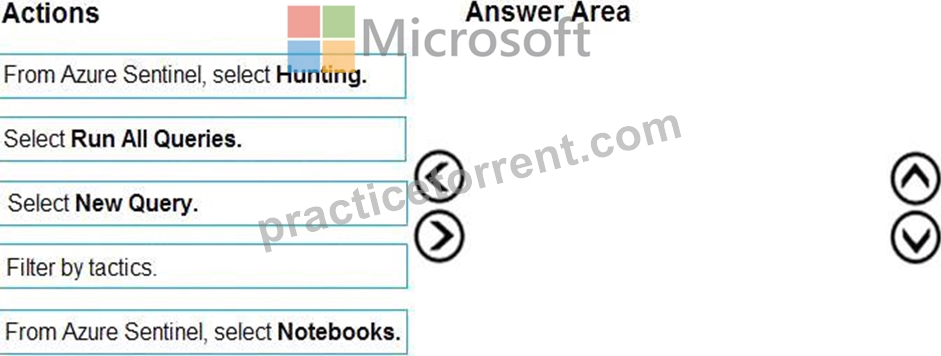
Answer:
Explanation: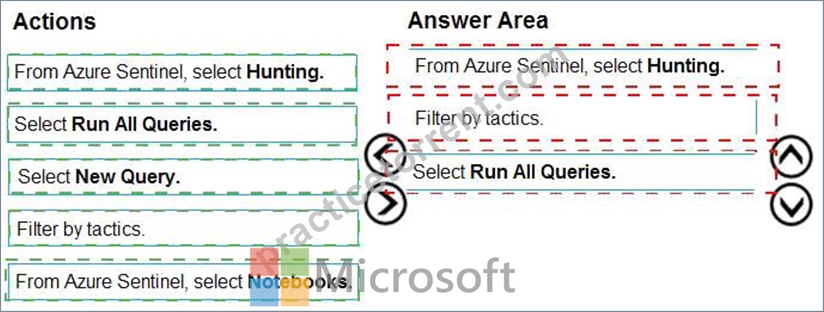
Explanation: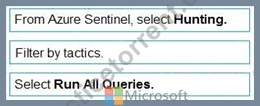
NEW QUESTION # 200
You need to add notes to the events to meet the Azure Sentinel requirements.
Which three actions should you perform in sequence? To answer, move the appropriate actions from the list of action to the answer area and arrange them in the correct order.
Answer:
Explanation:
Explanation:
To attach notes that you can later see during investigations and hunting, you use Bookmarks in Microsoft Sentinel. Bookmarks are created from the Hunting (or Logs) experience inside the Sentinel workspace and let you pin a specific query result (including IPs, accounts, hosts) with notes, tags, and mapped entities so it appears in the investigation graph and is easily referenceable. The correct workflow is: first, run your KQL query from the Microsoft Sentinel workspace (not from generic Azure Monitor), because Sentinel's hunting experience is where bookmarks integrate with incidents and the investigation graph. Next, select a specific query result that represents the suspicious activity (e.g., a data access event from the target IP). Finally, create a Bookmark and map the relevant entity (IP address, Account, etc.) while adding your notes. Mapping the entity ensures the bookmarked event is connected in the investigation graph; the notes provide the narrative
/context you need when pivoting later. Adding the query to favorites is optional for convenience but does not attach notes to a specific event, and running the query from Azure Monitor would not place the bookmark within Sentinel's investigation context.
NEW QUESTION # 201
You have an Azure subscription that contains the users shown in the following table.
The subscription contains instances of Azure Firewall as shown in the following table.
You have a Microsoft 365 E5 subscription that uses Microsoft Copilot for Security. You have the Copilot for Security role assignments shown in the following table.
Each user runs a Copilot for Security session.
For each of the following statements, select Yes if the statement is true. Otherwise, select No.
NOTE: Each correct selection is worth one point.
Answer:
Explanation:
Explanation:
Yes No Yes
NEW QUESTION # 202
You are informed of a new common vulnerabilities and exposures (CVE) vulnerability that affects your environment.
You need to use the Microsoft Defender portal to request remediation from the team responsible for the affected systems if there is a documented active exploit available.
Which three actions should you perform in sequence? To answer, move the appropriate actions from the list of actions to the answer area and arrange them in the correct order.
Answer:
Explanation:
Explanation:
* From Vulnerability Management, select Weaknesses, and search for and select the CVE.
* Select Go to related security recommendations.
* Create the remediation request.
According to Microsoft Defender Vulnerability Management documentation, the correct workflow for responding to a new CVE in your organization-especially when there is an active exploit-is to begin your investigation within the Vulnerability Management section of the Microsoft Defender portal.
* From Vulnerability Management, select Weaknesses -Microsoft explains that all known CVEs are listed under Weaknesses in the Defender portal. You search by CVE ID (for example, CVE-2024-xxxx) to view its details, exploitability data, and the devices affected.
* Select Go to related security recommendations -After opening the CVE details, the portal shows associated security recommendations that describe how to remediate the issue (such as updating software, removing an at-risk version, or applying a patch). Selecting Go to related security recommendations links the CVE directly to actionable remediation guidance.
* Create the remediation request -Finally, Microsoft Defender for Endpoint allows security teams to formally request remediation from IT administrators or system owners. You can create a remediation request directly from the recommendation page, assigning it to the responsible group and specifying a due date.
This sequence aligns with Microsoft's recommended remediation workflow for CVEs as described in Defender Vulnerability Management documentation and ensures that remediation actions are tracked and executed efficiently through the portal.
# Therefore, the correct order is:
(1) From Vulnerability Management # Weaknesses # search CVE # (2) Go to related security recommendations # (3) Create remediation request.
NEW QUESTION # 203
Your network contains an on-premises Active Directory Domain Services (AD DS) domain that syncs with Azure AD.
You have a Microsoft 365 E5 subscription that uses Microsoft Defender 365.
You need to identify all the interactive authentication attempts by the users in the finance department of your company.
How should you complete the KQL query? To answer, select the appropriate options in the answer area.
NOTE: Each correct selection is worth one point.
Answer:
Explanation:
NEW QUESTION # 204
You have an Azure subscription that contains the following resources:
* A virtual machine named VM1 that runs Windows Server
* A Microsoft Sentinel workspace named Sentinel1 that has User and Entity Behavior Analytics (UEBA) enabled You have a scheduled query rule named Rule1 that tracks sign-in attempts to VM1.
You need to update Rule 1 to detect when a user from outside the IT department of your company signs in to VM1. The solution must meet the following requirements:
* Utilize UEBA results.
* Maximize query performance.
* Minimize the number of false positives.
How should you complete the rule definition? To answer select the appropriate options in the answer area.
NOTE: Each correct selection is worth one point.
Answer:
Explanation:
Explanation:
To detect sign-ins to VM1 by users outside the IT department while leveraging UEBA, you should enrich Windows security events with identity attributes from UEBA's enrichment tables. In Microsoft Sentinel, UEBA writes organizational attributes (e.g., Department, Title, AAD object IDs/SIDs) to the IdentityInfo table. Joining SecurityEvent (Event IDs 4624/4625) with IdentityInfo on the user SID lets you filter with where Department != "IT"-meeting the requirement to utilize UEBA results.
For performance and fewer false positives, use join kind=inner. An inner join only returns rows where the user in SecurityEvent has a corresponding identity record in IdentityInfo, avoiding unmatched and potentially noisy events. Options like fullouter would introduce non-matching rows (increasing noise), and anti would return only unmatched rows (the opposite of what's needed).
BehaviorAnalytics contains anomaly scores/events rather than static attributes like department, and SigninLogs is raw AAD sign-in telemetry (not the UEBA-enriched identity inventory needed for department filtering). Therefore, IdentityInfo is the correct enrichment source.
Thus, to satisfy use UEBA, maximize performance, and minimize false positives: join kind=inner with IdentityInfo and then filter Department != "IT".
NEW QUESTION # 205
You have an Azure subscription that contains a Microsoft Sentinel workspace. The workspace contains a Microsoft Defender for Cloud data connector. You need to customize which details will be included when an alert is created for a specific event. What should you do?
- A. Modify the properties of the connector.
- B. Enable User and Entity Behavior Analytics (UEBA)
- C. Create a Data Collection Rule (DCR).
- D. Create a scheduled query rule.
Answer: B
NEW QUESTION # 206
You need to configure the Microsoft Sentinel integration to meet the Microsoft Sentinel requirements. What should you do? To answer, select the appropriate options in the answer are a. NOTE: Each correct selection is worth one point.
Answer:
Explanation:
Topic 2, Contoso Ltd
To start the case study
To display the first question in this case study, click the Next button. Use the buttons in the left pane to explore the content of the case study before you answer the questions. Clicking these buttons displays information such as business requirements, existing environment, and problem statements. If the case study has an All Information tab, note that the information displayed is identical to the information displayed on the subsequent tabs. When you are ready to answer a question, click the Question button to return to the question.
Overview
A company named Contoso Ltd. has a main office and five branch offices located throughout North America. The main office is in Seattle. The branch offices are in Toronto, Miami, Houston, Los Angeles, and Vancouver.
Contoso has a subsidiary named Fabrikam, Ltd. that has offices in New York and San Francisco.
Existing Environment
End-User Environment
All users at Contoso use Windows 10 devices. Each user is licensed for Microsoft 365. In addition, iOS devices are distributed to the members of the sales team at Contoso.
Cloud and Hybrid Infrastructure
All Contoso applications are deployed to Azure.
You enable Microsoft Cloud App Security.
Contoso and Fabrikam have different Azure Active Directory (Azure AD) tenants. Fabrikam recently purchased an Azure subscription and enabled Azure Defender for all supported resource types.
Current Problems
The security team at Contoso receives a large number of cybersecurity alerts. The security team spends too much time identifying which cybersecurity alerts are legitimate threats, and which are not.
The Contoso sales team uses only iOS devices. The sales team members exchange files with customers by using a variety of third-party tools. In the past, the sales team experienced various attacks on their devices.
The marketing team at Contoso has several Microsoft SharePoint Online sites for collaborating with external vendors. The marketing team has had several incidents in which vendors uploaded files that contain malware.
The executive team at Contoso suspects a security breach. The executive team requests that you identify which files had more than five activities during the past 48 hours, including data access, download, or deletion for Microsoft Cloud App Security-protected applications.
Requirements
Planned Changes
Contoso plans to integrate the security operations of both companies and manage all security operations centrally.
Technical Requirements
Contoso identifies the following technical requirements:
Receive alerts if an Azure virtual machine is under brute force attack.
Use Azure Sentinel to reduce organizational risk by rapidly remediating active attacks on the environment.
Implement Azure Sentinel queries that correlate data across the Azure AD tenants of Contoso and Fabrikam.
Develop a procedure to remediate Azure Defender for Key Vault alerts for Fabrikam in case of external attackers and a potential compromise of its own Azure AD applications.
Identify all cases of users who failed to sign in to an Azure resource for the first time from a given country. A junior security administrator provides you with the following incomplete query.
BehaviorAnalytics
| where ActivityType == "FailedLogOn"
| where ________ == True
NEW QUESTION # 207
You have an Azure subscription that uses Microsoft Defender for Cloud and contains a storage account named storage1. You receive an alert that there was an unusually high volume of delete operations on the blobs in storage1.
You need to identify which blobs were deleted.
What should you review?
- A. the alert details
- B. the related entities of the alert
- C. the activity logs of storage1
- D. the Azure Storage Analytics logs
Answer: D
Explanation:
To identify which blobs were deleted in an Azure Storage account, you must review Azure Storage Analytics logs, which record all operations (including DeleteBlob and DeleteContainer requests) made against the storage service.
These logs contain details such as timestamp, requester IP, operation type, and object name-allowing you to pinpoint the exact blobs deleted.
* Activity logs (Option B) record control-plane operations (e.g., resource creation or configuration changes), not data-plane operations like blob deletions.
* Alert details and related entities (Options C and D) summarize detection context but do not include full operation-level details.
# Correct answer: A. the Azure Storage Analytics logs
NEW QUESTION # 208
You have an Azure subscription that contains a Log Analytics workspace named Workspace1.
You configure Azure activity logs and Microsoft Entra ID logs to be forwarded to Workspace1.
You need to identify which Azure resources have been queried or modified by risky users.
How should you complete the KQL query? To answer, select the appropriate options in the answer area.
NOTE: Each correct selection is worth one point.
Answer:
Explanation:
Explanation:
NEW QUESTION # 209
You have a Microsoft 365 subscription that uses Microsoft Defender for Endpoint.
You need to add threat indicators for all the IP addresses in a range of 171.23.3432-171.2334.63. The solution must minimize administrative effort.
What should you do in the Microsoft 365 Defender portal?
- A. Select Add indicator and set the IP address to
- B. Select Add indicator and set the IP address to
- C. Create an import file that contains the IP address of 171.23.34.32/27. Select Import and import the file.
- D. Create an import file that contains the individual IP addresses in the range. Select Import and import the file.
Answer: D
Explanation:
Explanation
This will add all the IP addresses in the range of 171.23.34.32/27 as threat indicators. This is the simplest and most efficient way to add all the IP addresses in the range.
Reference:
[1] https://docs.microsoft.com/en-us/windows/security/threat-protection/microsoft-defender-atp/threat-intelligenc
NEW QUESTION # 210
Your on-premises network contains 100 servers that run Windows Server.
You have an Azure subscription that uses Microsoft Sentinel.
You need to upload custom logs from the on-premises servers to Microsoft Sentinel.
What should you do? To answer, select the appropriate options m the answer area.
Answer:
Explanation:
NEW QUESTION # 211
......
SC-200 Study Guide Realistic Verified SC-200 Dumps: https://actual4test.practicetorrent.com/SC-200-practice-exam-torrent.html